
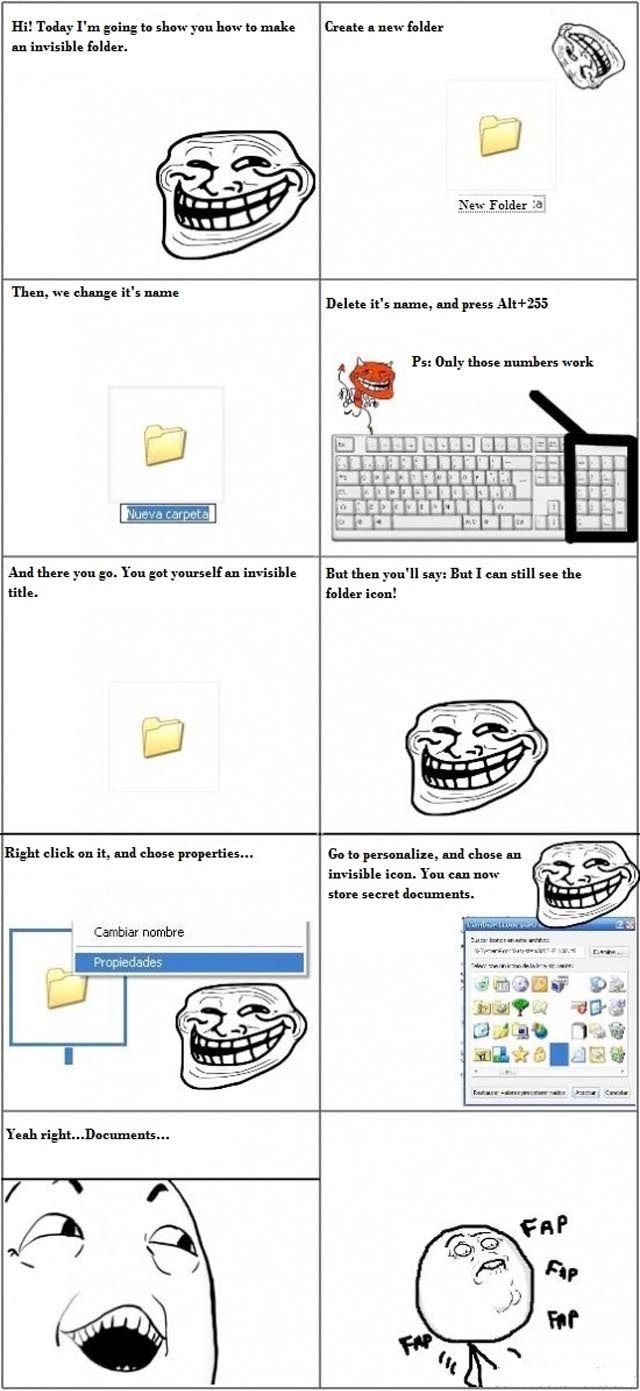



Cool Trick For Your Computer

Posted in PICTURES       27 Sep 2011       13237       10 GALLERY VIEW

Check out this humorous but detailed illustration about how to make certain things disappear on your computer.


Cool Trick For Your Computer


Advertisement


10   Comments ?
0
1.
Enter your name 14 year s ago
wow.. it actually works.. the troll face made me wonder is something would shut down or be deleted
       
2
2.
BullFrog 14 year s ago
Hint for your mom:
Click on the desktop, press ctrl+A, no more invisible folders.
       
0
3.
Enter your name 14 year s ago
fap fap fap fap fap
       
0
4.
loller 14 year s ago
if 225 doesnt work, try 0160
       
0
5.
suckmycock 14 year s ago
haha 225, obviously it say 255
       
1
6.
Tarzan 14 year s ago
very old trick..
       
0
7.
fuchsblut 14 year s ago
I couldn't get this to work....
       
0
8.
lolipop 14 year s ago
good tricks......
       
0
9.
aguds 14 year s ago
Haha, actually works. But I can't seem to delete or rename it? using Vista btw.
       
0
10.
Lilia 14 year s ago
If you want to hide your folders use <<Winmend Folder Hidden<< - it's 100% free! Or encrypt them with Androsa File Protector, the best program, also free!

P.s. If you are reading this on Oct. 7, 2011 you can download KRYPTEL (a$30.00 program) for free on Giveawayoftheday.com.
       
27353641acute
belayclappingdance3dashdirol
drinksfoolgirl_craygirl_devilgirl_witch
goodgreenheartJC-LOLJC_doubledown
JC_OMG_signkisslaughingman_in_lmocking
mr47_04musicokroflsarcastic
sm_80tonguevishenka_33vomitwassat
yahooshoot
Advertisement


Advertisement


pgslot

บาคาร่า

Casinos not on Gamstop

non gamstop casinos

สล็อต888

Nastyhookups.com

Instagram Views from BuzzVoice

pgslot

Casinos not on Gamstop

amb888

pussy888

justuk.club list of casinos not on GamStop

£10 non-GamStop casino options

games not on GamStop for UK players

bideford.com guide to non GamStop casinos

joker123

slotxo

pgslot


Advertisement

Archives

2023
2022
2021
2020
2019
2018
2017
2016
2015
2014
2013
2012
2011
2010
2009
2008
0000
Advertisement


How to comment

•    Don't insult other visitors. Offensive comments will be deleted without warning.

•    Comments are accepted in English only.

•    No swearing words in comments, otherwise such comments will be censored.

•    Your nickname and avatar are randomly selected. If you don't post comments for 7 days, they both are reset.

•    To choose another avatar, click the ‘Random avatar’ link.

random_banner_2